
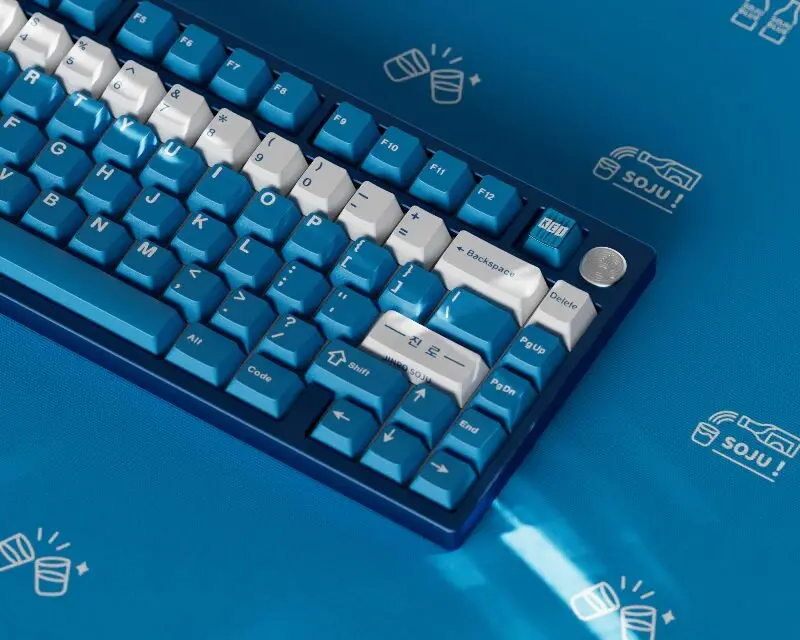
Mechanical keyboards have grown from niche enthusiast products into widely used tools for gamers, programmers, writers, and everyday computer users. One of the most popular ways to personalize a mechanical keyboard is by installing custom keyboard keycaps.
Unlike standard keycaps that come with most keyboards, custom keycaps allow users to change the look, feel, and durability of their typing experience. Whether someone prefers a minimal professional setup for office work or a colorful keyboard for gaming, keycaps make that customization possible without replacing the entire keyboard.
The mechanical keyboard market has expanded rapidly in recent years. According to industry reports referenced by Statista, the global keyboard market continues to grow steadily as remote work, gaming, and PC customization trends increase. Enthusiast communities on platforms like Reddit’s r/MechanicalKeyboards—now with millions of members—also demonstrate the rising interest in keyboard customization.
Among all keyboard upgrades, custom keyboard keycaps are one of the simplest yet most impactful improvements. In this guide, we’ll explain what custom keycaps are, why users choose them, the different types available, and how to select the right set for your keyboard.
What Are Custom Keyboard Keycaps?
Custom keyboard keycaps are replacement caps that fit on top of mechanical keyboard switches. Each keycap represents a key on the keyboard and can be swapped out individually without modifying the keyboard’s internal components. If you’re new to upgrading your keyboard, learning about mechanical keycaps can help you understand how different materials, profiles, and compatibility options affect both typing feel and overall performance before choosing a replacement set.
Most stock keyboards ship with basic ABS plastic keycaps designed for mass production and cost efficiency. Custom keycaps, on the other hand, are often designed with higher-quality materials, different profiles, and unique visual styles.
A typical mechanical keyboard contains between 61 and 104 keys depending on the layout. Custom keycap sets usually include all necessary keys for common layouts and sometimes extra keys for alternative configurations.
The majority of modern custom keycaps are designed to fit MX-style switch stems, the cross-shaped stem popularized by Cherry MX switches. Many well-known keyboard brands—including Keychron and others—use compatible stems, which makes upgrading keycaps relatively simple.
For example, a programmer working long hours may replace stock keycaps with textured PBT keycaps for improved durability, while a gamer might choose sculpted profiles or themed keycap sets to match their gaming setup.
If you’re looking to explore high-quality options, you can browse a wide selection of custom keyboard keycaps designed for mechanical keyboard enthusiasts.
Why Do People Use Custom Keyboard Keycaps?
1. Improved Typing Feel
Different materials and profiles can noticeably change the typing experience. Thicker PBT keycaps, for example, often produce a deeper sound and more solid feel compared with thinner ABS keycaps.
For writers, developers, or office professionals who type thousands of words daily, this subtle improvement can make long typing sessions more comfortable.
2. Better Durability
Stock keycaps made from ABS plastic tend to develop a shiny surface over time due to finger oils and wear. Higher-quality keycaps—especially PBT keycaps—are generally more resistant to shine and fading.
According to materials testing data from manufacturers and enthusiast reviews, PBT plastic typically has greater heat resistance and structural stability compared with ABS.
3. Personal Style and Aesthetic
Keyboard setups have become part of personal workspace design. Many users choose custom keycaps to match desk themes, PC builds, or RGB lighting.
Popular themes include:
· Minimal monochrome sets
· Retro computer styles
· Anime or gaming-inspired designs
· Professional neutral color palettes
4. Enhanced Visibility and Legends
High-quality legends (letters on the keys) are important for users who frequently switch layouts or work in low-light environments. Techniques such as double-shot molding and dye-sublimation help ensure the legends remain visible even after years of use.
For many mechanical keyboard users, custom keycaps represent a balance between function and personalization—turning a standard keyboard into a tool that better fits their workflow.
What Types of Custom Keycaps Are Available?
ABS vs PBT Keycaps: What’s the Difference?
| Feature | ABS Keycaps | PBT Keycaps |
| Texture | Smooth | Slightly textured |
| Durability | Can develop shine over time | More resistant to wear |
| Sound | Higher-pitched | Deeper sound |
| Cost | Usually cheaper | Often slightly more expensive |
ABS keycaps are common in mass-produced keyboards because they are easier to manufacture. However, many enthusiasts prefer PBT because of its resistance to shine and its more textured typing feel.
Some premium keycap sets also use thick ABS with double-shot molding, which can still offer excellent durability.
Popular Keycap Profiles Explained (Cherry, OEM, SA, XDA)
| Profile | Characteristics | Best For |
| OEM | Standard profile used by many keyboards | General typing |
| Cherry | Slightly shorter than OEM | Comfortable typing |
| SA | Tall and sculpted | Retro aesthetics |
| XDA | Flat and uniform height | Custom layouts |
Cherry and OEM profiles are commonly recommended for beginners because they feel familiar and ergonomic. Taller profiles like SA create a distinctive sound and visual style but may take time to adjust to.
Printed, Double-Shot, and Dye-Sublimated Keycaps
The legend printing method also affects keycap quality.
· Pad Printed: Ink printed on the surface. Typically cheaper but may fade over time.
· Double-Shot Keycaps: Legends are molded from a second layer of plastic, making them extremely durable.
· Dye-Sublimated Keycaps: Dye is infused into the plastic surface, producing long-lasting legends.
Among enthusiasts, double-shot and dye-sublimated keycaps are often considered the most durable options.
How to Choose the Right Custom Keycaps for Your Keyboard
Compatibility with Mechanical Switches
Most modern mechanical keyboards use MX-style stems, originally popularized by Cherry MX switches. Keycaps designed for MX stems typically fit keyboards from brands such as Keychron, Ducky, and many custom keyboard kits.
However, some keyboards—especially low-profile models—use different switch designs. Before buying keycaps, check that the keycap set specifically states MX compatibility.
Layout Considerations (60%, 75%, TKL, Full-Size)
| Layout | Number of Keys | Use Case |
| 60% | ~61 keys | Compact setups |
| 75% | ~84 keys | Space saving with arrows |
| TKL | ~87 keys | Balanced typing and gaming |
| Full-Size | 104 keys | Includes number pad |
Some custom keycap sets include extra modifier keys so they can support multiple layouts. Always confirm the set includes keys for your specific layout before purchasing.
Design, Legends, and Color Themes
Once compatibility is confirmed, users can focus on design preferences.
Many professionals prefer minimalist color schemes like black, white, or gray for office environments. Gamers often choose brighter themes or translucent keycaps that work well with RGB lighting.
Another consideration is legend clarity. High-contrast legends can improve readability and reduce typing mistakes.
Ultimately, the best custom keycaps combine comfort, durability, and visual appeal. Testing different profiles and materials can help users discover what works best for their daily typing tasks.
Where to Buy High-Quality Custom Keyboard Keycaps
The custom keyboard market now includes many online retailers and specialty brands. When shopping for keycaps, it helps to evaluate a few key factors:
· Material quality (ABS vs PBT)
· Legend manufacturing method
· Layout compatibility
· Profile preference
· Customer reviews
Mechanical keyboard communities often recommend buying from trusted retailers that clearly list specifications and compatibility.
A good retailer should provide:
· Detailed product photos
· Keycap profile information
· Compatibility descriptions
· Reliable customer service
For users looking to upgrade their keyboard setup, exploring a curated collection of custom keyboard keycaps can be a convenient starting point. These collections typically include a variety of materials, profiles, and color themes designed to fit common mechanical keyboard layouts.
Conclusion
Custom keyboard keycaps offer one of the easiest and most effective ways to personalize a mechanical keyboard. By changing the material, profile, and design of the keys, users can improve typing comfort, durability, and visual style.
From durable PBT keycaps to sculpted profiles like Cherry or SA, the range of options allows both beginners and enthusiasts to tailor their keyboard setup to their preferences.
While the best choice ultimately depends on typing habits, keyboard layout, and aesthetic preferences, understanding the differences between materials and profiles makes it much easier to select the right set.
For anyone interested in upgrading their keyboard, exploring different custom keyboard keycaps can be an excellent first step toward building a keyboard that feels truly personal and enjoyable to use.
